
Every hour, every absence, every asset — accounted for.
Attendance, leave, assets and internal communication in one self-hosted system, built and supported by Z-Axiss and configured to how your organisation actually works.
This is what the portal produces for every person, every day — a defensible record rather than a punch time. Late, early, short-hours, absent and holiday-work states are decided by your policy, and every override keeps the original calculation on file.
One system for the work that surrounds the work.
Most companies run attendance in one tool, leave in another, equipment in a spreadsheet and announcements in a chat thread nobody can search. Nothing reconciles, so every payroll cycle turns into an investigation.
The portal puts all of it in one place, with three purpose-built views so people only ever see the part that is theirs — and you deploy it on your own infrastructure, with no per-seat licence and no workforce data in someone else's account.
Everyone sees their part of it, and nothing else.
Clock in, request, check, done
- Clock in and out, see today's shift and hours
- Live leave balances and request history
- Explain a late arrival before anyone asks
- See assigned equipment and confirm receipt
Their team, decided today
- Who is in, late, absent or on leave — right now
- Approve leave, excuse lateness, review absences
- Team calendar before approving overlaps
- Team-only reports and balances
The rules, and the receipts
- Shifts, leave types, quotas, fiscal years, locations
- Accounts, roles, invitations and access
- Company-wide attendance, leave and asset data
- Corrections and exports with a full log
Everything the working day actually touches.
Nine modules that share one set of people, one policy layer and one audit trail — so a clock-in, a leave balance and a laptop handover all reconcile against each other.
Attendance that holds up to scrutiny
Employees clock in from the portal. The system confirms they are where they should be, matches the record to their assigned shift, and works out the rest.
Clock-ins are verified against the work locations you define — your office IP range — and each employee can be permitted at specific locations only. The portal calculates late arrival against that shift's grace period, unusually early arrivals, short hours against scheduled duration, and whether the day fell on a public holiday. Night shifts that cross midnight stay attached to the correct working day.
- Verified clock-in. Office IP range, with per-employee permitted locations.
- Forgotten clock-outs handled. Open sessions close automatically instead of becoming 14-hour days.
- Automatic absence. No clock-in within your window? The day is marked and queued for review.
- Bring your past data. Bulk import historic attendance from a spreadsheet.
Payroll-ready hours at the end of the month, with no timesheet chasing and no argument about who was on site.
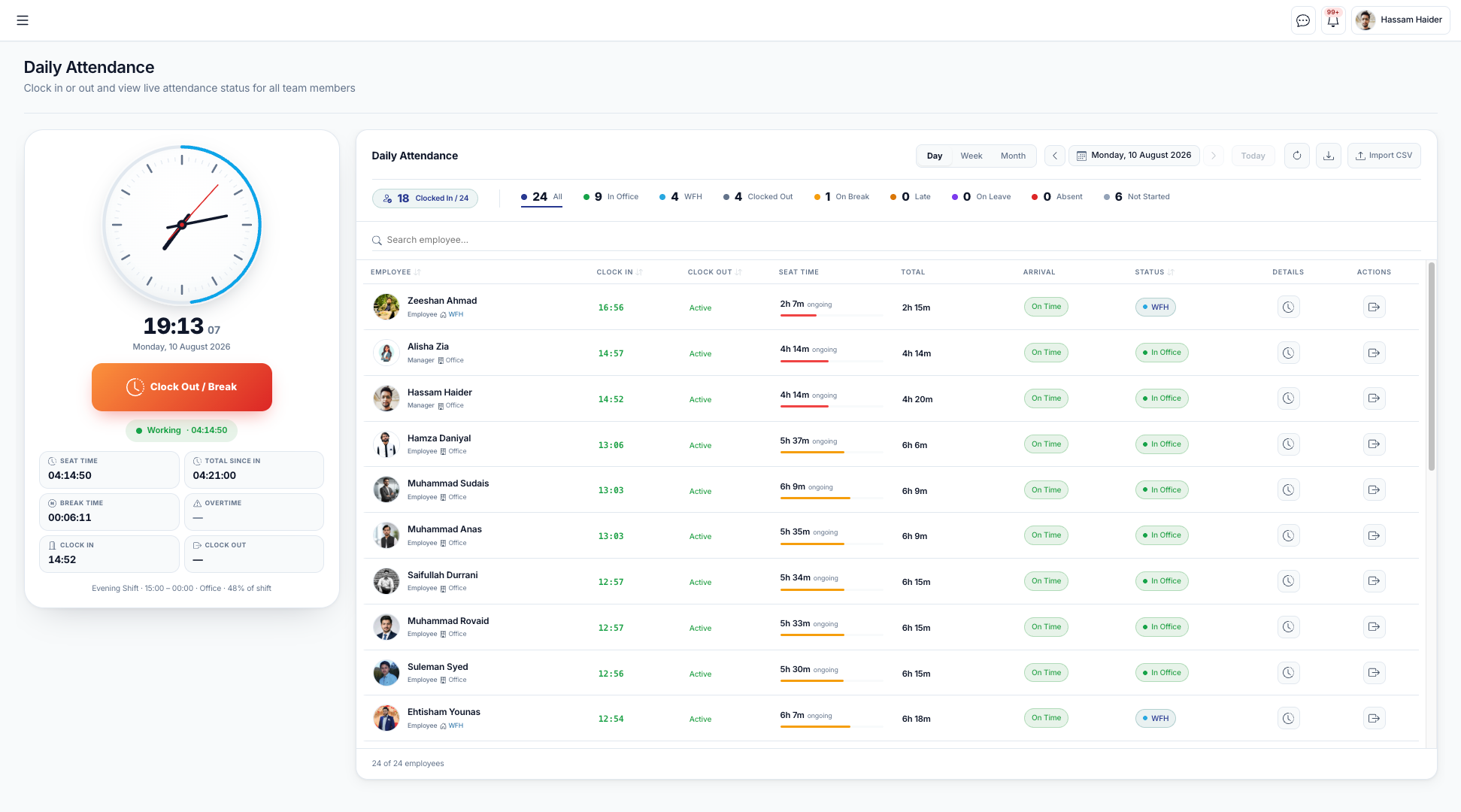
Today, company-wide — clocked in, in office, WFH, on break, late, on leave and absent, with seat time per employee.
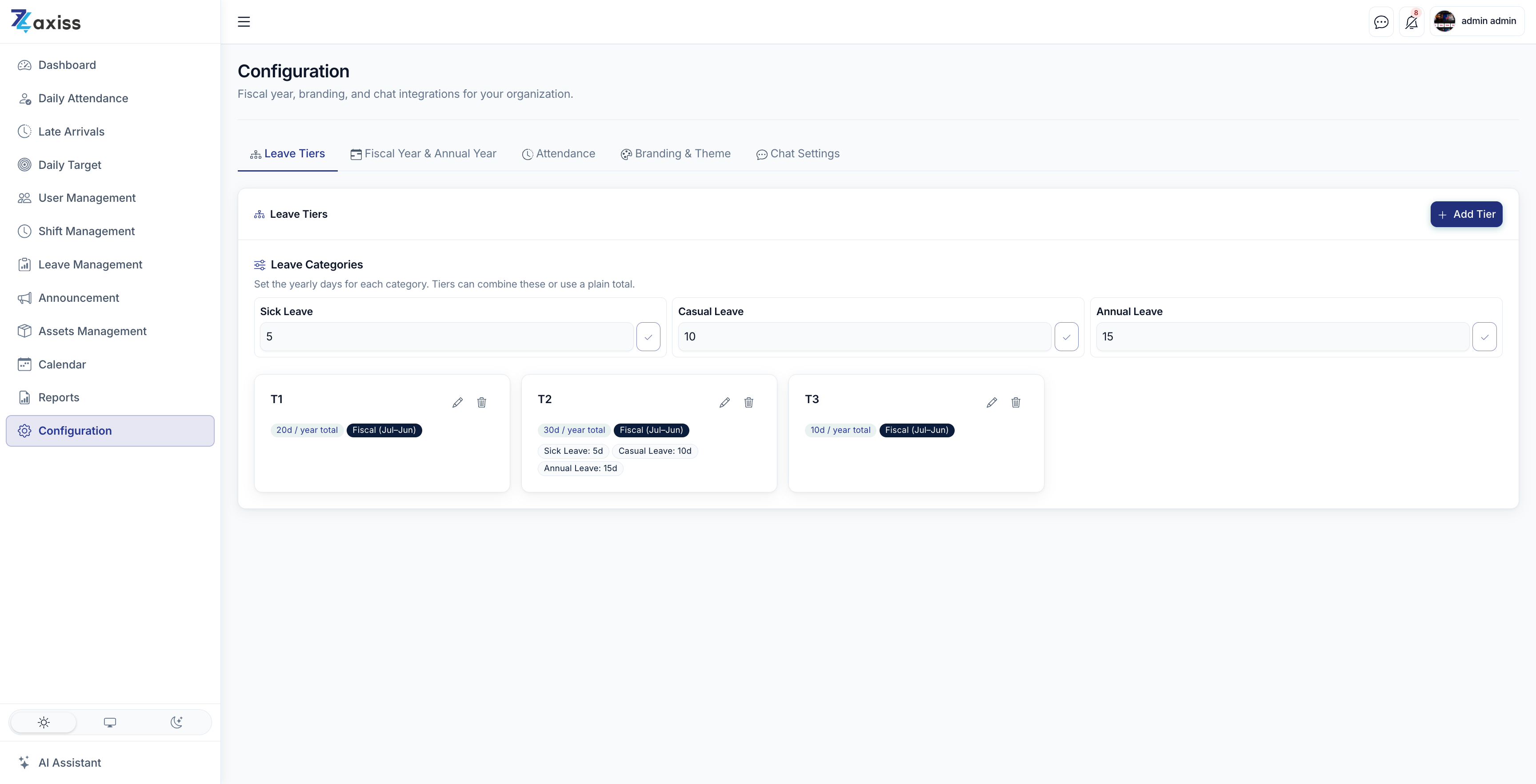
Where the rules live — leave tiers, categories and fiscal year settings, alongside attendance, branding and chat configuration.
Your rules, not a vendor's defaults
The reason most attendance tools get abandoned is that they cannot express how the business actually works. This one is configured, not compromised with.
Administrators define shifts with their own start and end times, expected duration, grace period before a late flag, an early-arrival threshold, and how long the system waits before marking someone absent. Leave types carry their own rules: paid or unpaid, days per year, carry-forward limits, approval requirements and probation eligibility.
- Shift rules. Grace minutes, early-arrival threshold, auto-absence window, overnight support.
- Leave tiers and categories. Sick, casual and annual day counts, combined into the tiers your grades use.
- Fiscal & annual year. Define your own leave year; overlaps are rejected before balances break.
- Branding & theme. Your logo and colours, so the portal reads as your system.
Policy changes are a configuration screen — not a support ticket and a three-week wait.
Leave balances people can trust
Every balance in the portal is the sum of a recorded transaction history — not a number someone typed into a cell and hoped was right.
Entitlements are credited per fiscal year, and every approval, cancellation, adjustment or unpaid deduction is written to the leave ledger as its own entry. Requests count only working days, skipping weekends and your configured public holidays, and check balance and probation rules before they are accepted.
- Ledger-backed balances. Every credit and debit is an entry you can inspect.
- Accurate day counts. Weekends and public holidays excluded automatically.
- Approval workflow. Requests, comments, decisions and a full activity log.
- Holiday compensation. Worked a public holiday? Grant compensatory leave from the record.
HR stops arbitrating balance disputes, because the ledger already answers them.
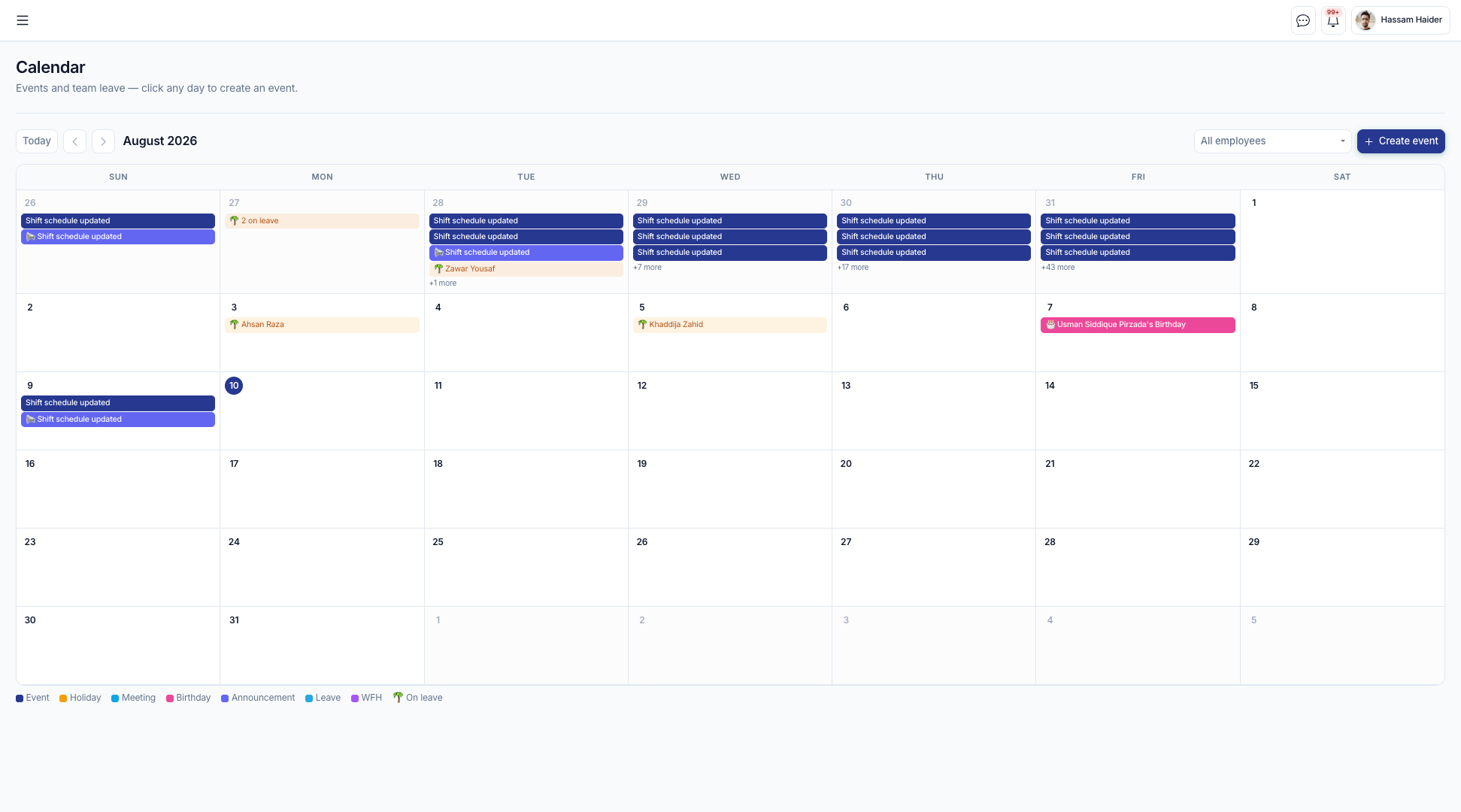
Coverage at a glance — the calendar a manager reviews before approving, with leave, WFH, holidays and announcements colour-coded.
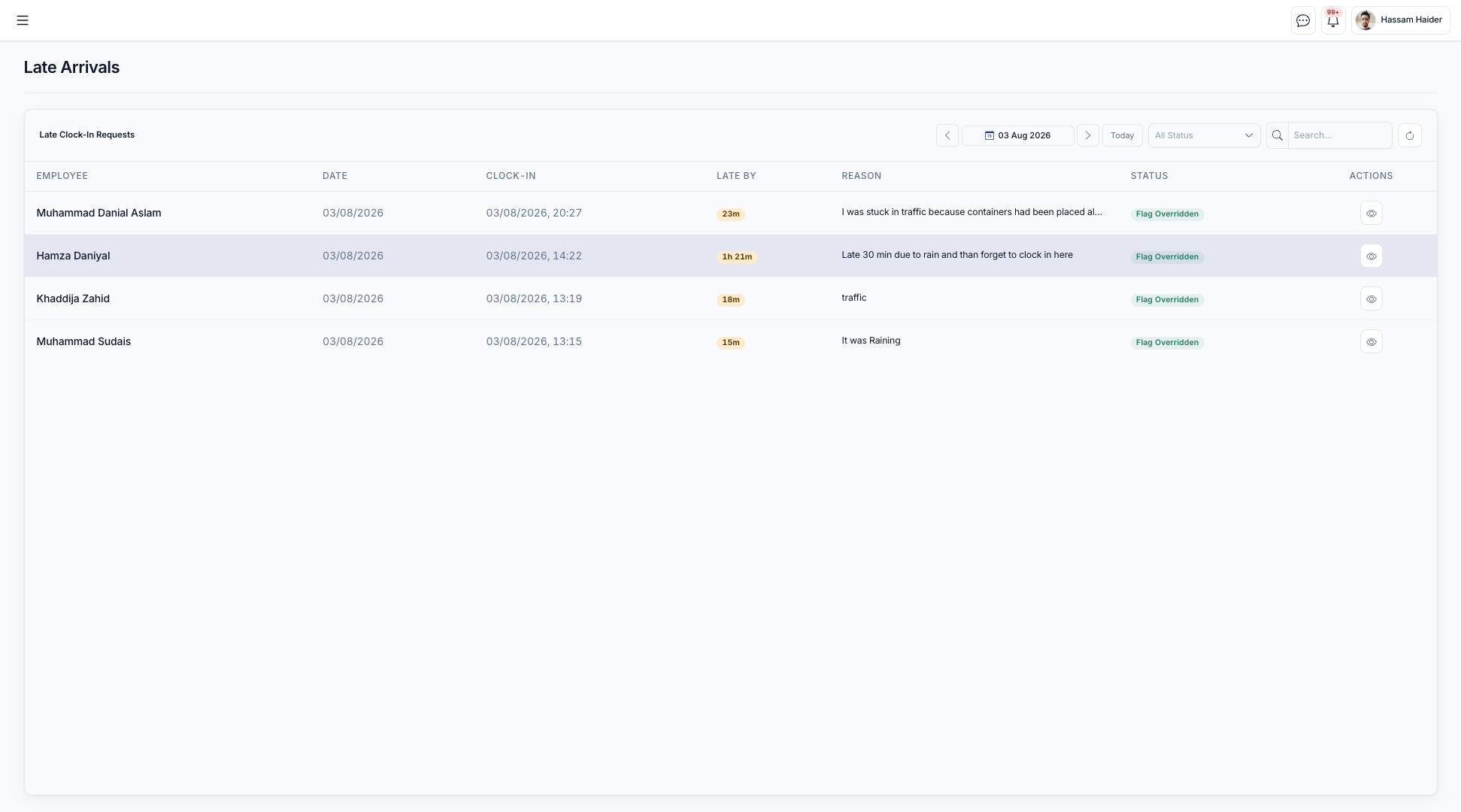
The review queue — each late clock-in with exactly how late it was, the employee's own reason, and the decision recorded against it.
Exceptions get a decision, not a shrug
Late arrivals and missed days are where attendance systems normally break down. Here they are a short, documented workflow with an owner and an outcome.
When someone clocks in late, they submit the reason themselves — before anyone has to ask. Managers see the request with the exact minutes late and the shift it was measured against, then either excuse it or record the time as unpaid leave, which flows straight through to the ledger. An override never erases what happened: the original calculation is preserved alongside the decision, the reviewer and the timestamp.
- Employee-submitted reasons. Lateness is explained at source, with a history the employee can see.
- One-action outcomes. Excuse the flag, or convert the time to unpaid leave automatically.
- Override with memory. The original flag, the reviewer and the reason are all retained for audit.
Fair treatment that is also provable — the two things a difficult conversation actually needs.
Know who has the laptop
Equipment is registered once, assigned to people, acknowledged by them, and returned on the record — so offboarding is a checklist instead of an archaeology project.
Every asset carries a name, serial number, category and status, and always shows its current holder. Assignments are dated, and the employee confirms receipt in their own portal, which gives you a signed handover rather than a verbal one. Returns close the assignment cleanly and put the item back into available stock.
- Single inventory. Serial-tracked, categorised, with live status and current holder.
- Assign and acknowledge. A dated handover the employee confirms in writing.
- Full chain of custody. Per-asset history for audits, insurance and exits.
Nothing walks out the door unrecorded, and last-day recovery takes one screen.
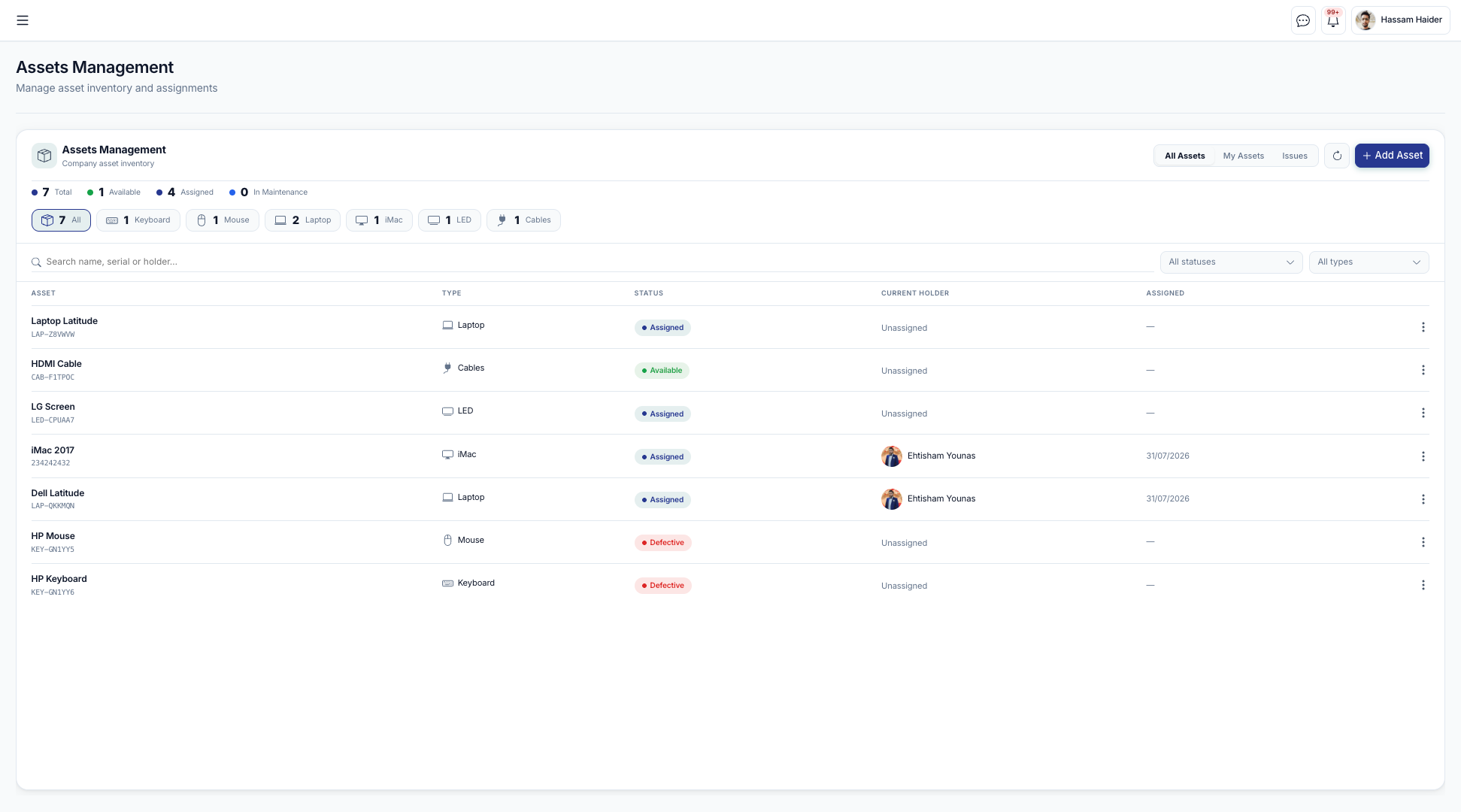
The inventory — every asset with its serial, type, status and current holder, counted by category.
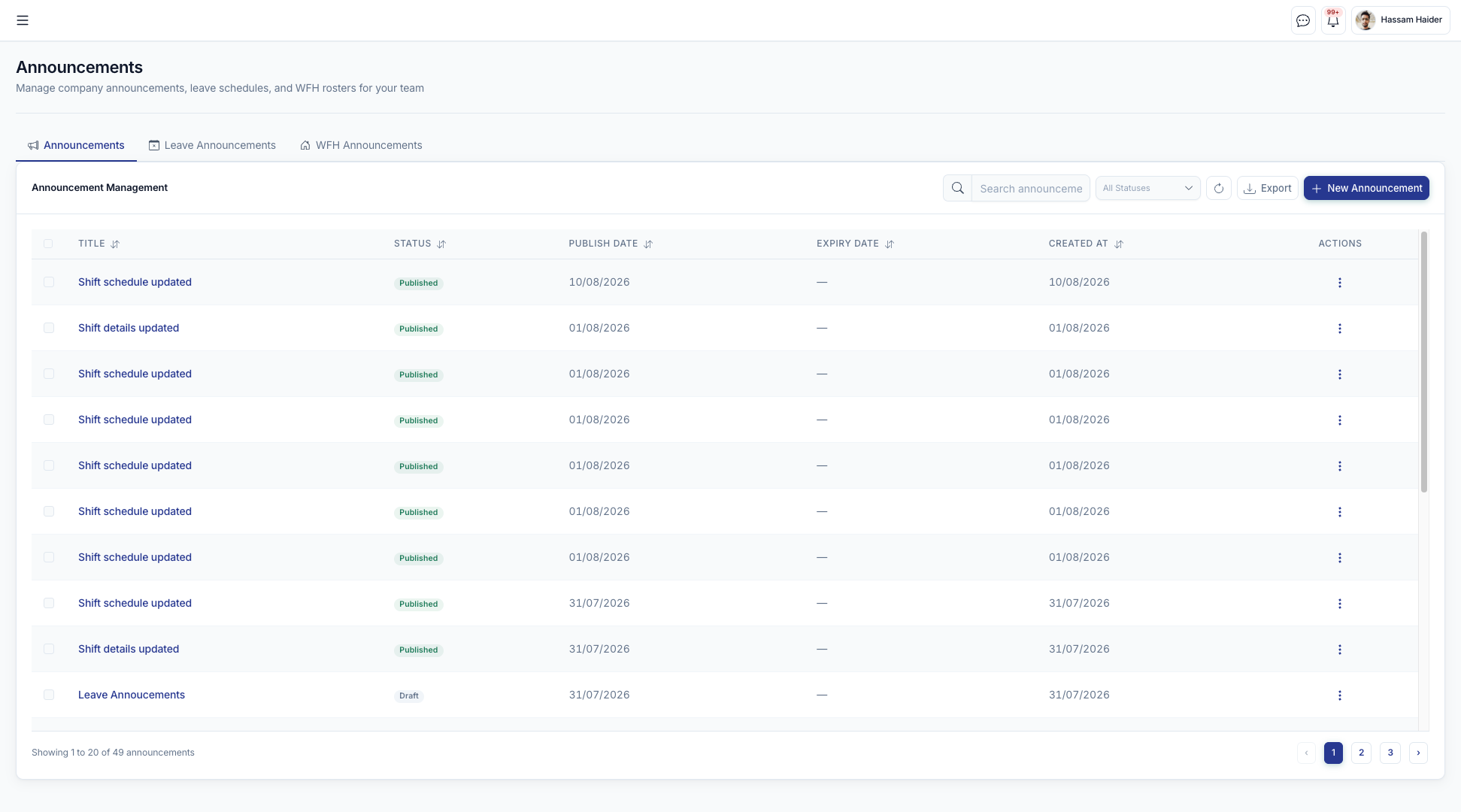
Publishing a notice — company, leave and work-from-home announcements managed together, with publish and expiry dates.
One place people actually look
Company news, who is off, who is remote this week, and which days the office is closed — published once, visible to everyone, and searchable later.
Announcements are drafted, published when ready, and expire on a date so the notice board never fills with last quarter's news. Alongside them sit leave announcements and weekly work-from-home announcements that name exactly who is remote. Public holidays are maintained centrally and can be synced from Google Calendar.
- Draft, publish, expire. A notice board that stays current, with file attachments.
- WFH weeks, named. Who is remote, for which week — no more guessing who is in.
- Live notifications. In-app alerts with a searchable history, plus optional email and Google Chat.
Fewer “is anyone in the office today?” messages, and no more missed policy notices.
A standup that leaves a record
Each person posts what they are working on today. Managers read the whole team's board for any date — no meeting required.
Daily targets are short, dated notes tied to the person who wrote them, editable during the day and visible on a single board. Because they are stored rather than spoken, a manager can look back at any date and see what the team set out to do, which makes reviews concrete instead of anecdotal.
- One board, any date. The whole team's intentions for the day in one view.
- Written, not spoken. A searchable history that makes reviews evidence-based.
- Posts to Google Chat. Keeps the habit visible where the team already talks.
Replaces the daily status meeting, and still leaves you the record the meeting never did.
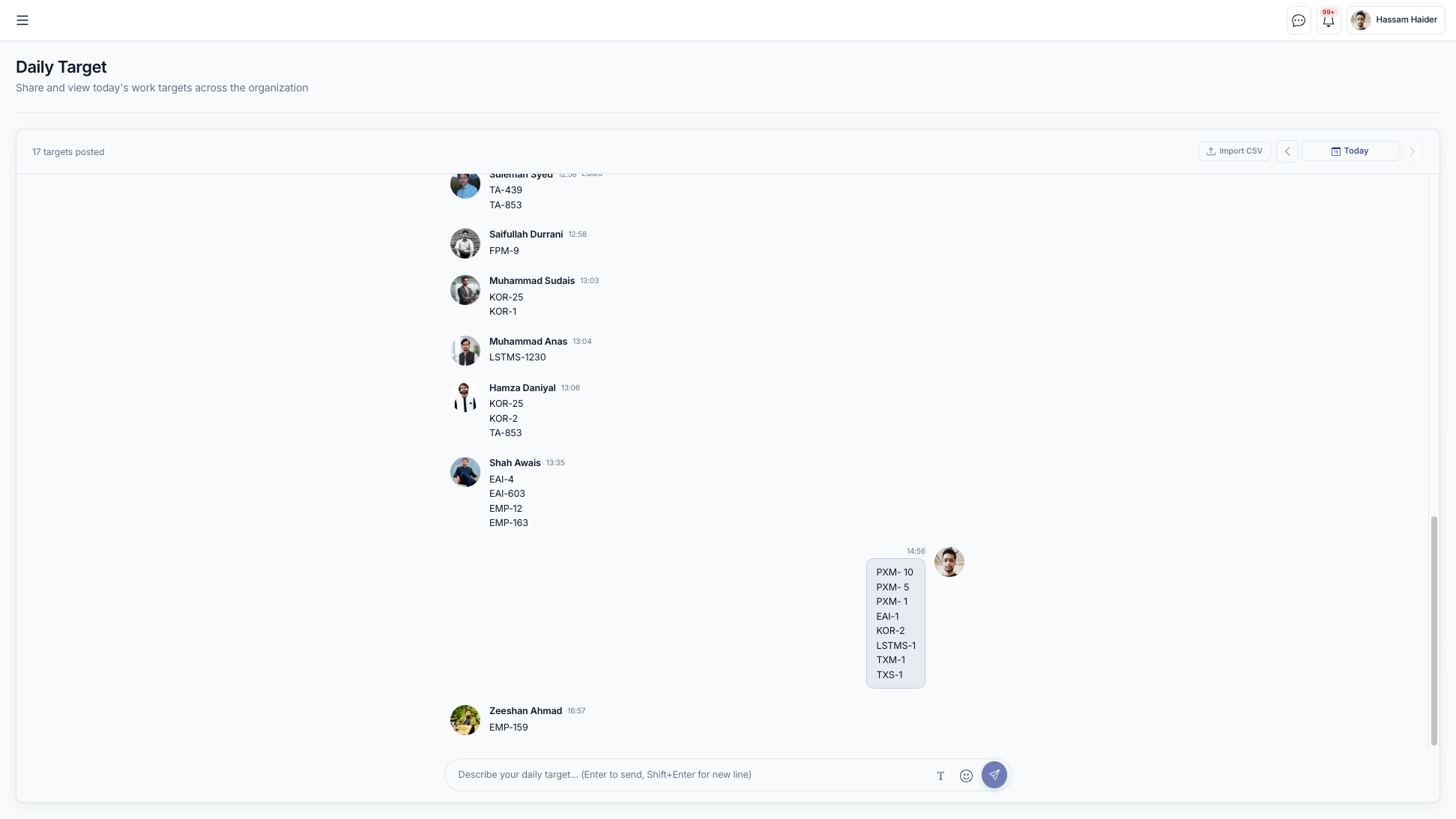
Today's board — every target posted for the selected date, with who wrote it and when.
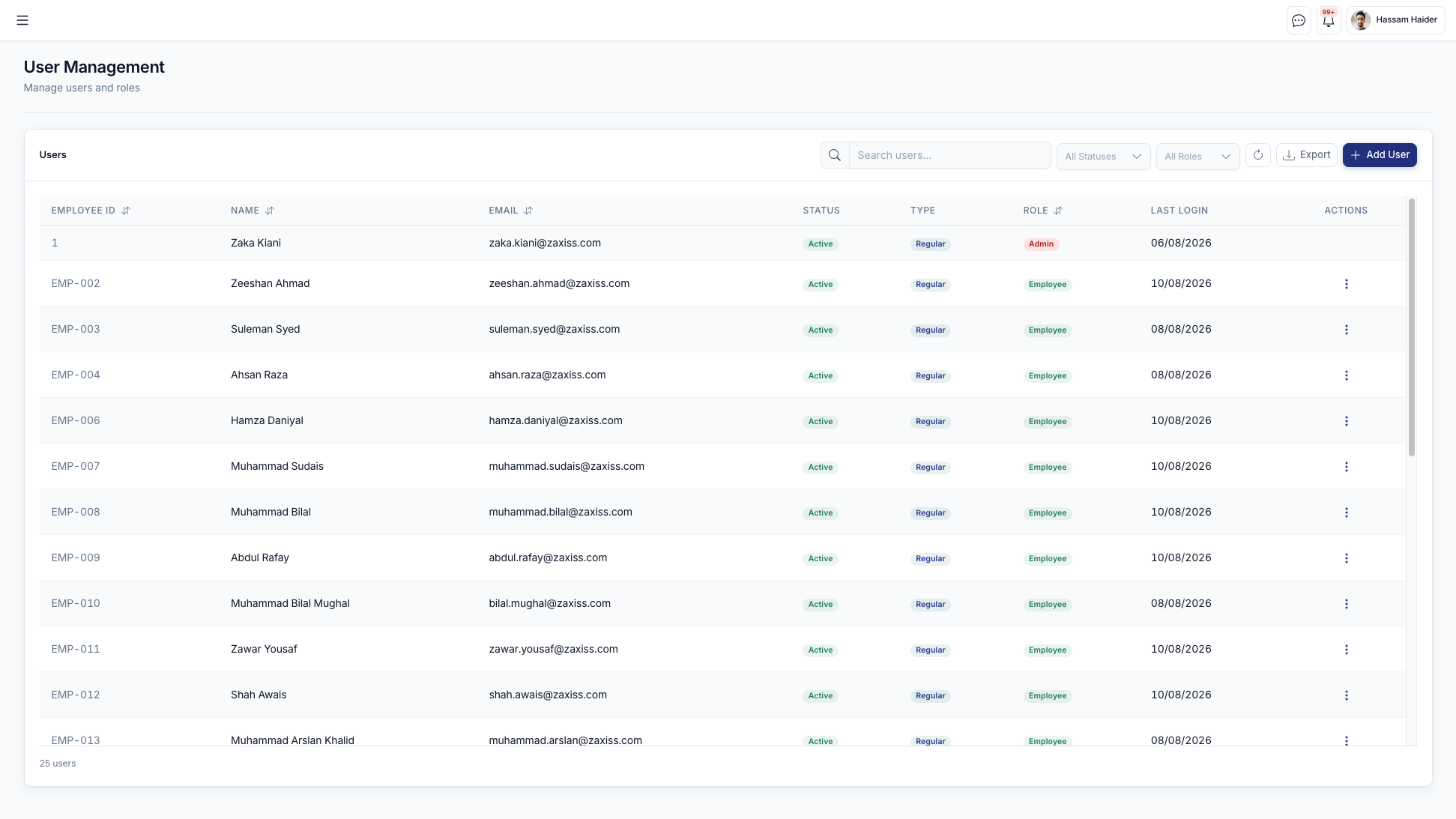
People and permissions — employee records with ID, status, type, role and last login, alongside invite and role-change actions.
The right people, the right data, provably
Access is decided per company and per role, and every sensitive action leaves a record — which is what turns an internal tool into something you can be audited on.
Staff join by invitation link with an expiry, verify their email, and are assigned roles that determine exactly which portal and which data they see. Managers are confined to their own team throughout. Administrators can activate, deactivate, reset and correct — with the correction logged rather than silently applied.
- Invitation-based onboarding. Expiring links, email verification, self-set passwords.
- Role-scoped portals. Employee, manager and admin views, plus an API-only integration role.
- Audit log. Who did what, when, from where — including the reason for overrides.
- Multi-company. Separate data per entity, one login, explicit switching.
You can answer “who changed this, and why” without asking anyone to remember.
Built to run on your infrastructure, on your terms.
A complete application you own and deploy — not a seat-based subscription with your workforce data in someone else's account.
Deployment
Containerised, started with a single command, on your servers or a managed host. No per-seat licence.
Data ownership
A PostgreSQL database you control, with schema upgrades applied automatically on release.
Integrations
Google Calendar, Google Chat, email delivery and CSV import for historic data.
Open API
A documented REST API with a dedicated integration role for payroll, HRIS or BI.
Security
Token authentication, hashed passwords and per-company isolation enforced at the query layer.
Quality
An automated suite covering business rules, permissions and isolation, run on every change.
Experience
Responsive throughout — phones for clocking in, desktops for administration.
Adaptable
Modules, fields and rules extended to fit how you already work.
You are not buying a download.
Z-Axiss implements the portal end to end, and stays with it afterwards.
Discovery & policy mapping
We map your shifts, leave types, entitlements and approval chains onto the portal's configuration before anything is installed.
Deployment & migration
Installed on your infrastructure or ours, with historic attendance, leave balances and asset records imported at go-live.
Customisation
Extra modules, fields, reports and integrations built by the same engineering team that built the product.
Training & support
Role-based onboarding for employees, managers and administrators, plus ongoing maintenance and upgrades.
See the portal running on your own scenarios.
Tell us a little about your organisation and we will walk you through the modules that matter to you — with your shift and leave rules in mind.
- A working session, not a slide deck
- Configured against your shifts and leave policy
- Deployment and migration questions answered directly
Ready to see it on your own rules?
We will configure a walkthrough around your shifts, leave policy and locations, and answer the deployment questions directly.